
24 min read

Network CapEx Is the Smallest Line on Your AI Cluster BOM — and the One That Determines What Every Other Dollar Can Earn

Network CapEx Is the Smallest Line on Your AI Cluster BOM — and the One That Determines What Every Other Dollar Can Earn

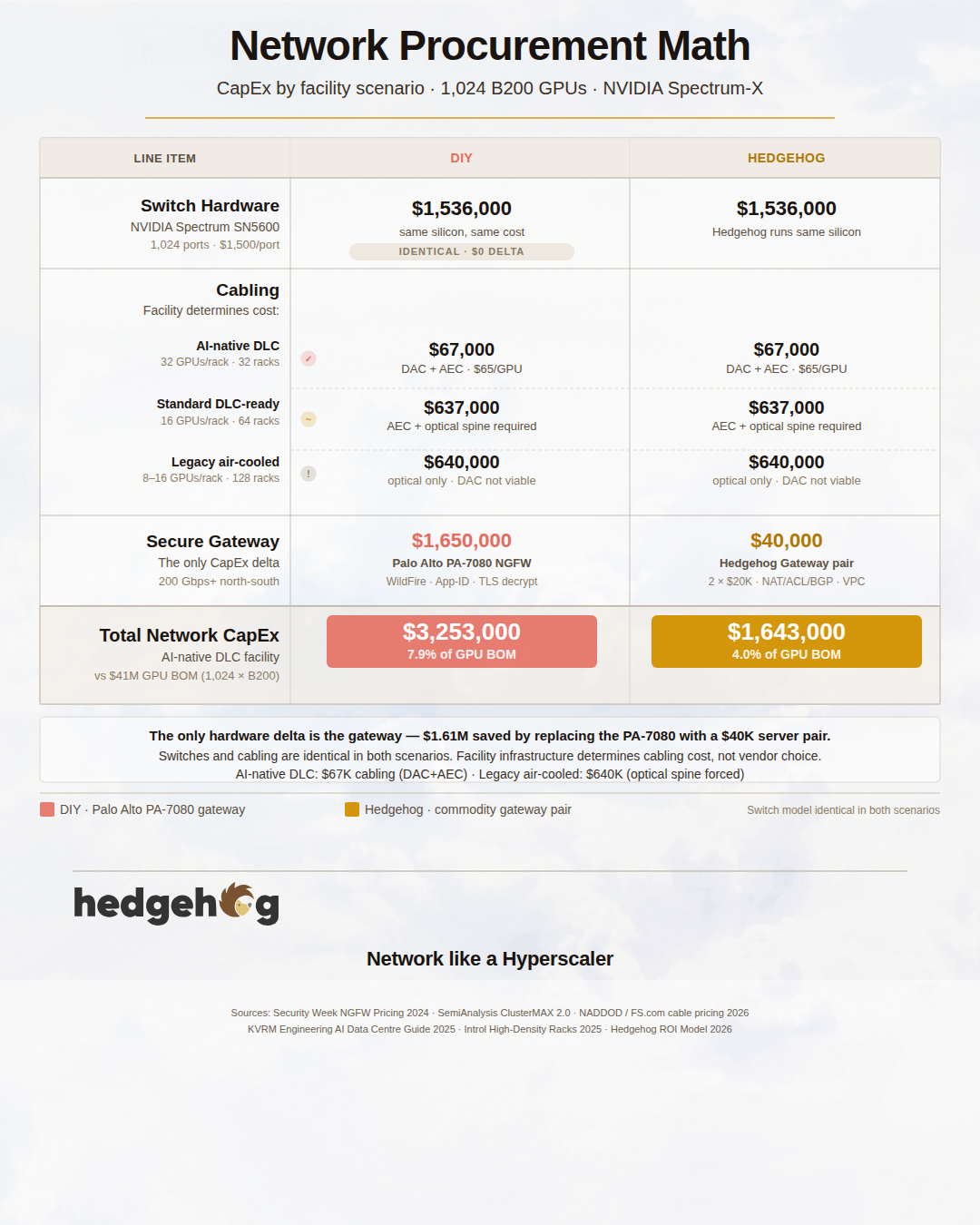
When teams build AI clusters, the budget conversation almost always starts and ends with GPUs. That is rational. GPUs dominate the capital expenditure. Servers, power, cooling, storage, and facilities fill the remaining space. Network procurement — switches, cables, and a secure gateway — is what's left after everything else is accounted for. At 1,024 GPUs on any of the current Blackwell or Instinct accelerators, the switching fabric plus cabling and gateway typically represents 3–15% of the GPU hardware cost, depending on which accelerator you've chosen and which cabling path you take. The cable choice alone can swing that by more than $600,000.

And yet network procurement is the decision that determines whether the GPUs in your cluster run at 60% utilization or 98%, whether a security incident impacts one tenant or your entire fleet, and whether your operations team is four people or eight. The decisions made in that 3–15% of the BOM constrain what every other dollar in the build is permitted to earn.

This post works through the procurement decisions directly: switches, cables, and the gateway — what you're actually buying, what it costs across the full range of accelerators in the current market, and why certain decisions carry consequences that extend well beyond their face value. The downstream operating effects — performance benchmarks, reliability incident rates, security blast radius — are covered in the companion posts in this series. This post stops at the procurement boundary.


What You Are Actually Buying

The network procurement surface for a large-scale AI cluster decomposes into three hardware decisions: switch silicon, cabling, and the secure gateway. All three interact. The cabling choice is constrained by the physical distances in your facility and the switch silicon you've chosen. The gateway choice is independent of both. Together, the three determine your network CapEx, your ongoing power draw, and — less obviously — how easily your operations team can maintain and evolve the fabric over its five-to-seven year service life.


Decision 1: Switch Silicon

Two platforms dominate the 800G AI switching market in 2026.

NVIDIA Spectrum SN5600

The SN5600 is NVIDIA's flagship 51.2 Tbps Spectrum-X switch, released in volume in 2024 and now the reference platform for NVIDIA-validated AI fabric deployments. Per NVIDIA's datasheet:

  • 64 ports × 800GbE OSFP plus 1 × 25GbE SFP28 management port
  • Spectrum-4 ASIC (TSMC 4N, ~100 billion transistors)
  • 51.2 Tbps aggregate switching bandwidth, 33.3 Bpps forwarding rate
  • 2U form factor, 11.7 kg
  • Cumulus Linux or Pure SONiC NOS
  • RoCE extensions for NVIDIA Spectrum-X (per-flow adaptive routing, packet spraying, congestion control), end-to-end nanosecond timing precision
  • x86 CPU, secure boot, BMC management

If you want NVIDIA's end-to-end guarantee — Spectrum switches + BlueField-3 SuperNICs + ConnectX-7 NICs + NetQ telemetry + adaptive routing tuned against real Blackwell training workloads — the SN5600 is the only supported path. Hedgehog supports Spectrum switches as an NVIDIA-validated Spectrum-X solution.

That integration guarantee has a price. An SN5600 typically prices in the $90,000–$110,000 per switch range, or roughly $1,500 per 800G port. For a 1,024-GPU cluster requiring approximately 1,024 ports across leaf and spine, the switch line is around $1.54 million.

Celestica DS5000

The DS5000 is the first OCP-Accepted 800G switch on the OCP marketplace — the same standard that Microsoft, Meta, and Google use to specify their hyperscale network hardware. Per Celestica's datasheet and the OCP design specification (v1.2):

  • 64 ports × 800GbE OSFP, plus 2 × 25GbE SFP28 and 1 × 1GbE RJ45 management
  • Broadcom Tomahawk 5 ASIC (the same silicon family used inside hyperscale cloud fabrics at Microsoft, Meta, and others)
  • 51.2 Tbps aggregate switching bandwidth — bit-for-bit the same as Spectrum SN5600
  • 2U form factor, designed against the OCP Networking specification
  • SONiC or any ONIE-compatible NOS (DENT, Cumulus, OcNOS, FBOSS)
  • Intel Xeon D-1627 CPU, hot-swappable redundant PSUs and fans, BMC
  • Hardware-equivalent to the SN5600 on every spec line that matters for an AI fabric: bandwidth, port density, buffer architecture, forwarding capacity

Per-port pricing for OCP commodity switches typically lands at 35–40% of NVIDIA Spectrum-X cost, or approximately $600 per 800G port. The same 1,024-port fabric builds out at approximately $614,000— 40 cents on the dollar versus the Spectrum-X path.

Hedgehog AI network runs on both substrates. The choice between them is an operational and vendor-relationship question, not a networking capability question.


Decision 2: Cabling

Cabling is the most overlooked line in the network BOM and, at scale, one of the most consequential decisions for long-term operating cost. Most procurement conversations start with the cable options — DAC, AEC, or optical — and work backward from price. That is the wrong order. The right starting point is your facility: floor load capacity, power delivery, and cooling technology together determine how many GPUs fit in a rack, which determines how many racks you need, which determines how long your cable runs will be, which determines which cable types are physically viable in the first place. A cabling choice that looks CapEx-efficient on a spec sheet may be simply impossible in your actual data hall.

This section covers facility constraints first, then the available media types, then the structured vs. unstructured cabling question, and finally two worked scenarios — CapEx-optimized and OpEx-optimized — with explicit notes on which facility configurations each one requires.


How Facility Infrastructure Determines Rack Density — and Why Rack Density Determines Your Cable Lengths

Before evaluating any cabling option, you need to understand what your facility will actually let you build. The cable run lengths in an AI cluster are not a network design parameter — they are a direct consequence of how many GPUs fit per rack, which is set by three physical constraints that exist long before network procurement begins: floor load capacity, power delivery, and cooling technology. Together they determine your rack density. Rack density determines your rack count. Rack count determines your row length. Row length determines your spine uplink distances. And spine uplink distances determine which cable types are physically achievable.

Three physical constraints determine how many GPUs can coexist in a rack. Each is independent. Each can be the binding limit. Understanding which one constrains your build — and what it would take to relax it — is the most important pre-procurement step in the cabling decision.

Floor Load Capacity

Traditional data centers have floor load limitations ranging from 500–1,000 kg/m². A single fully-populated GPU rack alone can surpass 1,000 kg of weight, which means heavy-duty AI applications can easily exceed the capacity of existing infrastructure. The structural requirement varies by how GPUs are configured:

ASCE 7-22 specifies a 100 PSF distributed load for access floor systems in computer use areas. The United Facilities Criteria specifies 150 PSF for central computer IT server spaces. Intel's 2012 Facilities Design guide recommends 350 PSF for high-density data centers.

In practice, a 4-server rack with 32 B200 GPUs at full load — servers, chassis, cabling, and cooling manifolds — weighs approximately 900–1,200 kg. Over the 0.6m × 1.2m floor footprint of a standard 600mm-wide rack, that is roughly 1,250–1,670 kg/m². Pre-2015 enterprise data centers designed to the 500–750 kg/m² range simply cannot host this equipment at full density without structural reinforcement. The floor becomes the binding constraint before power or cooling becomes relevant.

Power Delivery

Average rack power density has more than doubled in two years, from 8 kW to 17 kW, and is projected to reach 30 kW by 2027. AI training racks are already well ahead of that average. The latest Nvidia GPU servers require 132 kilowatts of power when fully loaded into a rack and the next generation will require 240 kilowatts.

Standard enterprise power distribution — 30A single-phase circuits, A-side/B-side redundancy — delivers approximately 5 kW per circuit to the rack PDU. A fully populated B200 rack drawing 40+ kW needs eight to ten such circuits, which no standard rack PDU can accommodate. Traditional 19-inch racks provide only 5–10 kW per cabinet, insufficient for modern AI and HPC workloads. Major cloud providers deploy ORv3-HPR racks from the Open Compute Project, increasing GPU server density to 300 kW per cabinet to support AI model training, HPC, and high-density inference workloads.

The required transition — to high-density 3-phase PDUs, busway power distribution, or HVDC at rack level — is a facility-level capital project, not a rack-level equipment swap.

Cooling Technology

This is the most widely discussed constraint, and the one that changed most sharply with the Hopper and Blackwell generations. A traditional server rack draws about 12 kW. An AI training rack packed with H100 or B200 GPUs draws 85 kW or more. Air cooling hits a physics wall around 30–40 kW per rack. Beyond that, you need liquid.

The B200 hits 1,000 watts per chip, and the GB200 NVL72 rack pulls 120 to 130 kW total. Air cooling, optimized for 8 to 12 kW racks, has no viable answer for that kind of density. Liquid cooling does.

The cooling transition is not binary. Three tiers describe the current market:

Air cooling with containment (CRAC/CRAH + hot-aisle containment): effective to approximately 20–30 kW per rack. Sufficient for H100 and MI300X at moderate server density; marginal for H200; not viable for B200 or above without throttling.

Rear-door heat exchangers / direct-to-chip (DLC): effective to approximately 40–80 kW per rack. The common 2025 retrofit path. Rear-door exchangers are passive and can be fitted without server modifications; direct-to-chip cold plates require server-level coolant manifolds but are far more effective at capturing GPU heat.

Full direct-to-chip or immersion liquid cooling: required above 80 kW per rack and standard for GB200, GB300, B300, and MI355X at full population. For rack densities above 35 kW, direct-to-chip liquid cooling is required. For densities above 100 kW per rack, immersion cooling provides the best solution.

The Three Facility Scenarios in the ROI Model

The Hedgehog ROI model uses three facility baseline assumptions, selectable on the project introduction page. These scenarios translate directly to rack density and, from there, to cable run lengths and cabling viability.

Legacy air-cooled (pre-2020 build or enterprise colo): floor load 750 kg/m², max 20 kW per rack, standard PDU power distribution, CRAC/CRAH cooling with hot-aisle containment. This is the baseline for existing enterprise data centers and many colocation builds that have not been upgraded for AI workloads.

Standard density / DLC-ready (2021–2024 colo or new-build): floor load 1,000 kg/m², max 50 kW per rack, high-density 3-phase PDUs and busway, rear-door heat exchangers or early direct-to-chip. Adequate for full H100, H200, and MI300X deployments; adequate for moderate B200 and B300 density.

AI-native (purpose-built or fully retrofitted 2025+): floor load 1,500+ kg/m², max 120 kW per rack, HVDC or LVDC busway with rack-level PDUs rated above 60 kW, direct-to-chip liquid cooling with dedicated CDU clusters. Required for GB200, GB300, B300, and MI355X at full population density.

How Rack Density Drives Cable Length

The connection from facility scenario to cable length is direct and often underestimated. It runs through rack count: the number of GPU racks needed for a 1,024-accelerator cluster is entirely a function of how many accelerators fit per rack.

Facility scenario

Typical GPUs/rack

GPU racks for 1,024 GPUs

Leaf switches

Row span

Legacy air-cooled

8–16

64–128 racks

64–128

Multiple long rows

Standard density

16–32

32–64 racks

32–64

1–2 rows

AI-native (DLC)

32

32 racks

32

Single row or cluster

With top-of-rack leaf switches (one per GPU rack), the server-to-leaf cable run is always within the same rack — typically 0.5–1.5 meters, firmly in passive DAC territory regardless of facility scenario. That part of the cable run is predictable.

The binding constraint is the leaf-to-spine uplink distance, which scales directly with row length, which scales directly with rack count. A 128-rack deployment across multiple rows can have spine uplinks averaging 12–18 meters or more for the far end of each row. A 32-rack single-row deployment has spine uplinks averaging 3–5 meters throughout.

Facility scenario

Rack count

Avg leaf-spine run

Spine uplink media required

Legacy air-cooled (8 GPUs/rack)

128 racks

12–20 m

Optical SR8 required

Standard density (16 GPUs/rack)

64 racks

6–12 m

AEC for near, optical for far racks

AI-native DLC (32 GPUs/rack)

32 racks

3–5 m

AEC throughout

This is the key structural finding that shapes the two cabling scenarios introduced later in this section:

The CapEx-optimized all-copper approach (DAC for server-to-leaf, AEC for spine uplinks) is only fully achievable in an AI-native liquid-cooled facility running 32 GPUs per rack. At that density, the entire 1,024-GPU cluster fits in 32 racks in a single compact row, and every spine uplink is within AEC reach. Total cabling CapEx: approximately $67,000 ($65/GPU).

At standard density (16 GPUs/rack, 64 racks), the all-copper approach is only partially achievable. Server-to-leaf runs remain in DAC territory. Spine uplinks for the nearer two-thirds of the deployment can use AEC; the far end of each row requires SR8 optical. Total cabling CapEx rises to approximately $637,000 — almost as much as the full structured-optical approach — because the optical transceiver cost on the spine dominates regardless of what media you use on the server-to-leaf segment.

At legacy density (8 GPUs/rack, 128 racks), all-copper is not viable. Spine uplinks average 15+ meters across a multi-row deployment, requiring SR8 optical throughout the spine tier. Total cabling CapEx at this density is approximately $640,000 — comparable to the full structured-optical path, but without its lifecycle management benefits. Choosing unstructured cabling at legacy density means spending nearly the same on cables as a well-managed optical installation, while giving up all the maintainability advantages.

The table below captures this facility-to-cabling cost chain for the most common accelerator and deployment combinations:

Full Network CapEx by Facility Scenario (1,024 GPUs, NVIDIA switches, PA-7080 gateway)

Accelerator

GPU BOM

Facility

GPUs/rack

Cabling CapEx

Total network CapEx

% of GPU BOM

H100 SXM5

$30.7M

Legacy air

16

$637K (optical spine)

$3.83M

12.5%

H100 SXM5

$30.7M

AI-native DLC

32

$67K (DAC+AEC)

$3.26M

10.6%

B200

$41.0M

Standard DLC

16

$637K (optical spine)

$3.83M

9.3%

B200

$41.0M

AI-native DLC

32

$67K (DAC+AEC)

$3.26M

7.9%

B300 / GB200

$46–47M

AI-native DLC

32

$67K (DAC+AEC)

$3.26M

6.9–7.1%

MI300X

$15.4M

Standard DLC

16

$637K (optical spine)

$3.83M

24.9%

MI300X

$15.4M

AI-native DLC

32

$67K (DAC+AEC)

$3.26M

21.2%

MI355X

$25.6M

AI-native DLC

32

$67K (DAC+AEC)

$3.26M

12.7%

The $570,000 difference in cabling CapEx between the optical-spine scenario ($637K) and the compact DAC+AEC scenario ($67K) is entirely a function of rack density, which is entirely a function of facility infrastructure. The network hardware budget is the same in both cases. The facility investment — in floor reinforcement, power distribution, and cooling infrastructure — is what unlocks the lower cabling cost.

This is a counterintuitive but important result: investing more in facility infrastructure (to enable higher rack density) reduces network cabling CapEx, because it compresses the physical footprint and eliminates the need for optical transceivers on spine links. The savings on optical transceivers alone — $588,000 at 256 spine links × 2 SR8 modules × $1,150 each — can partially offset the facility upgrade cost in a multi-year cluster deployment.

What the ROI Model Assumes — and How to Override It

The Hedgehog ROI model defaults to the AI-native DLC scenario: 32 GPUs per rack, direct-to-chip liquid cooling, single-row compact layout, average spine uplink distance of 3–5 meters. This is the facility configuration that makes all-copper cabling viable end-to-end and produces the lowest cabling CapEx figures in this analysis. It represents a purpose-built or fully retrofitted AI data hall.

If your facility is a legacy air-cooled environment or a standard-density DLC-ready build, the cabling picture changes materially — the all-copper path is partially or fully blocked, and optical transceivers become a budget line you cannot avoid. The interactive ROI model at hedgehog.cloud/playbook lets you select your facility scenario and recalculate cabling CapEx accordingly. The facility scenario selection also propagates into the performance and reliability models — a legacy air-cooled deployment running H100s at 16 GPUs per rack has different thermal throttling risk and different incident blast radius geometry than a compact liquid-cooled B200 deployment, and those differences flow through to the operating cost projections.

With the facility context established, the next question is which cable types are available at each distance, and what they cost.

The Three Media Types

There are three distinct physical media types in the current 800G market. Your facility scenario determines which are viable at each segment of the fabric; the descriptions below explain what each type does, where it fits, and what it costs.

Passive Direct Attach Copper (DAC) is the simplest option: a twinax copper cable with OSFP connectors at each end, no active electronics, near-zero additional power draw. At 800G, the physics of copper signal propagation constrain passive DAC to 2 meters maximum before signal attenuation becomes unacceptable. Within that envelope, DAC is the cheapest and most power-efficient cable available — generic-compatible 800G OSFP passive DAC at 1–2 meters prices at approximately $35–50 per cable at volume. It is the correct choice for any GPU-to-top-of-rack leaf connection where the server sits in the same rack or immediately adjacent rack and the cable run is under 2 meters. As the facility analysis above makes clear, this condition is reliably met only in AI-native deployments where high rack density keeps the leaf switch in the same rack as the servers it serves.

Active Electrical Cable (AEC) extends the copper reach by embedding DSP/retimer chips in each connector. The retimer reshapes the signal at both the transmit and receive ends, recovering clock, eliminating jitter, and regenerating a clean output — effectively resetting the signal's quality budget and enabling runs of up to 7 meters. AEC cables include active components at both ends to amplify and retimer signals, ensuring data transmission integrity and quality, with a maximum transmission distance of up to 7 meters. The tradeoff versus passive DAC is power: each AEC connector draws approximately 10–12 watts, so a single AEC cable adds 20–24 watts of power to the system. At volume, generic-compatible 800G OSFP AEC at 3–7 meters prices at approximately $80–120 per cable. AEC is the right choice for cross-rack connections within the same row where runs are 2–7 meters — the single most common scenario in a leaf-spine AI cluster where leaf and spine switches are in adjacent or nearby racks.

The most common "cross cabinet" distance in data centers is between 2 meters and 7 meters. Short DAC cable cannot reach it, and AOC optical is too expensive in terms of power consumption; AEC just fills the gap between performance and cost. Additionally, AEC uses finer copper wire gauges than passive DAC (30–32 AWG vs. 26 AWG), making the cables noticeably more flexible and easier to route along rack edges without the "stiff copper rod" problem that passive DAC creates at 800G speeds.

Optical transceivers with fiber are the only option for runs exceeding 7 meters and the preferred option for any deployment that prioritizes long-term manageability over initial CapEx. The three relevant variants for AI cluster deployments are:

  • SR8 (Short Range, 8-lane): multimode fiber (OM4 or OM5), up to 50 meters, approximately $1,100–1,750 per module (two required per link). Power draw approximately 14–15 watts per module. Best choice for runs within a single data center hall where distance exceeds AEC reach.
  • DR8 (Data Center Reach, 8-lane): single-mode fiber (SMF), up to 500 meters, approximately $1,400–2,250 per module (two required per link). Best for inter-row or inter-hall connections within a single campus.
  • FR8 (Fiber Reach, 8-lane): single-mode fiber, up to 2 kilometers, approximately $1,900–2,250 per module (two required per link). Best for campus or multi-building deployments.

The key advantage of optical over copper at any distance is the ability to use pre-terminated fiber trunk cables through structured cabling infrastructure — patch panels, MPO connectors, and labeled fiber pathways that make moves/adds/changes a patch-cord operation rather than a re-cabling operation. This distinction is where the structured vs. unstructured cabling question becomes financially significant.

Distance Decision Matrix

Run Type

Typical Length

Recommended Media

Cost Per Link

Power Per Link

GPU to top-of-rack leaf, same rack

0.5–2 m

Passive DAC

$40–50

~0 W

GPU to leaf, adjacent rack

2–4 m

AEC

$80–100

~22 W

Leaf to spine, same row

3–7 m

AEC

$90–120

~22 W

Leaf to spine, cross-row

7–30 m

SR8 optical + OM5 trunk

$2,200–3,500

~30 W

Leaf to spine, inter-hall

30–100 m

SR8 or DR8 + SMF

$2,800–4,500

~30 W

Data center interconnect

100 m–2 km

DR8 or FR8 + SMF

$2,800–4,500

~30 W


Structured vs. Unstructured Cabling

The cabling media choice — DAC, AEC, or optical — is distinct from the infrastructure approach used to deploy it. That second dimension is the structured vs. unstructured question, and it has a larger impact on five-year total cost than most operators realize when making the initial procurement decision.

Unstructured (point-to-point) cabling connects each device directly to every other device it needs to reach, with cables cut or selected to the exact length required at installation. It is fast to deploy on day one, requires no patch panels or cable management infrastructure, and appears to minimize upfront cost. In practice, it creates several compounding problems at scale.

As clusters grow or are reconfigured, point-to-point cable runs must be individually traced, labeled (if labeled at all), and physically replaced. A cable that was exactly right for the original topology becomes a problem when the topology changes — either it's too short to reach the new endpoint, or it has excess slack that blocks airflow in the rack. As time goes on, "extra length" cables become difficult to manage and they block air pathways in cabinets and racks used to cool data center equipment. This in turn increases the amount of energy needed to cool compute and storage devices. At 800G speeds and high rack densities, blocked airflow translates directly into GPU thermal throttling and in severe cases, hardware failure.

More consequentially: troubleshooting a network incident in an unstructured cabling environment is dramatically slower than in a structured one. When a link goes down and the physical cable run is not documented, a technician must physically trace the cable through the rack — a process that can take 20–60 minutes per link in a densely cabled environment. At 20+ incidents per 1,000 GPU-years (the Meta Llama 3 baseline), that diagnostic time adds up to material MTTR impact at cluster scale.

Structured cabling separates the permanent backbone (pre-terminated trunk cables running between patch panels or enclosures in fixed conduit paths) from the active connections (short patch cords from switch/server ports to the nearest panel). Moves, adds, and changes become patch-cord operations: unplug the short cord from the panel port, plug it into the new panel port, done — without touching the backbone infrastructure. AI clusters create massive cabling density. Unmanaged slack and ad-hoc point-to-point runs quickly block airflow and increase troubleshooting time. AI density changes the math: thousands of fibers demand trunks, panels, and repeatable pathways — not ad-hoc point-to-point runs.

The lifecycle cost comparison is consistent across industry literature: structured cabling costs 15–25% more to install initially, but reduces maintenance labor cost by 40–60% over a five-to-seven year data center lifecycle. For a 1,024-GPU cluster that will undergo multiple topology changes — new GPU generations, additional racks, spine upgrades — the structured cabling premium typically pays back within 18–24 months in avoided re-cabling labor alone.

The second benefit of structured cabling at 800G is precision. Pre-terminated MPO trunk cables are manufactured to exact lengths with factory-tested loss budgets. Field-terminated fiber at 800G is technically possible but practically difficult — PAM4 modulation at 100G per lane is highly sensitive to connector loss, and a marginally terminated field splice can cause intermittent link errors that are difficult to reproduce and diagnose. Pre-terminated structured cabling eliminates this class of problem entirely.


The Two Cabling Scenarios

Option A — CapEx-Optimized: DAC + AEC, Unstructured

Requires: AI-native DLC facility, 32 GPUs per rack, compact single-row layout. Not viable at standard or legacy density — see facility analysis above.

This scenario uses passive DAC for all server-to-leaf connections within a single rack (approximately 80% of server-to-switch links in a compact 32-GPU-per-rack deployment where server and leaf switch share the same rack), and AEC for the remaining cross-rack connections and all leaf-to-spine uplinks. Every spine uplink stays within the 7-meter AEC envelope because the entire 1,024-GPU cluster fits in 32 racks in a single compact row. Cables are point-to-point, unlabeled or minimally labeled, no patch panel infrastructure.

For a 1,024-GPU cluster with approximately 1,280 total cable runs: - 819 passive DAC links × $40 = $32,760 - 461 AEC links × $90 = $41,400 - Total Option A: ~$74,000 ($72 per GPU)

Incremental power from AEC electronics: approximately 11 kW across the cluster. With power at $0.10/kWh and 90% uptime, annual power cost of the AEC links is roughly $8,700.

This is the right choice for: budget-constrained builds, single-tenant clusters with fixed topology, or proof-of-concept deployments where the cluster will likely be re-racked or upgraded within 18 months anyway.

Option B — OpEx-Optimized: AEC + Structured Optical

Works at any facility scenario. At standard or legacy density where spine uplinks exceed 7 meters, this is the only structured path available — and as the facility analysis shows, the optical transceiver cost makes total cabling CapEx comparable to Option A regardless.

This scenario uses AEC for all server-to-leaf links (eliminating the fragility and inflexibility of passive DAC in high-density racks), and optical SR8 transceivers with pre-terminated OM5 multimode fiber trunks through a structured patch panel infrastructure for all leaf-to-spine links. Full labeling, documentation, and cable management throughout.

For the same 1,024-GPU cluster: - 1,024 AEC server-to-leaf links × $90 = $92,160 - 256 optical leaf-to-spine links × 2 SR8 modules × $1,150 = $588,800 - Fiber infrastructure and structured cabling (trunk cables, panels, patch cords) × 1,280 runs × $20 = $25,600 - Total Option B: ~$707,000 ($690 per GPU)

Incremental power from AEC and optics: approximately 32 kW across the cluster. Annual power cost at $0.10/kWh with 90% uptime is roughly $25,000.

Option B costs $633,000 more in CapEx. Over a five-year cluster life with quarterly topology changes (each avoided re-cabling event saves approximately $2,000–5,000 in labor), the structured infrastructure pays back in year two to three. More importantly, optical SR8 links with pre-terminated fiber are swap-in-place replaceable: a failed transceiver is a five-minute hot-swap operation. A failed AEC cable on a spine link requires draining the spine switch — a tenant-visible maintenance window.

This is the right choice for: production multi-tenant AI clouds expecting multiple GPU generations on the same infrastructure, colocation deployments where you don't own the facility, and any environment where MTTR is a contractual concern.


Decision 3: Perimeter Security

AI cloud builders face a threat landscape that didn't exist five years ago. Unlike general-purpose cloud infrastructure, AI clusters concentrate extraordinary value in a small physical footprint — model weights representing hundreds of millions of dollars in training compute, proprietary datasets, and real-time inference traffic that reveals exactly how a customer's business works. That concentration makes AI infrastructure a high-priority target, and unlike a data breach that exposes records, a model exfiltration can be nearly invisible until the stolen IP shows up in a competitor's product.

The architecture of GPU clusters compounds the risk. AI workloads run at extreme east-west bandwidth — hundreds of gigabits per second flowing between nodes during training — and that same high-throughput, low-latency fabric that makes distributed training possible also makes lateral movement fast and hard to detect if an attacker gets inside the perimeter. Traditional data center security models assumed most threats came from outside and that internal traffic was largely trusted. AI infrastructure inverts those assumptions: your crown jewels are inside the cluster, your tenants are potentially adversarial to each other, and the blast radius of a perimeter failure is measured in competitive advantage, not just records. Getting perimeter security right isn't an add-on — it's a prerequisite for being trusted to run anyone else's AI workloads.

This is where the only real CapEx difference between DIY and Hedgehog lives. And it's not subtle.

The gateway is the device that mediates north-south traffic: everything flowing between your tenants and the Internet, and between your management plane and the external world. For a multi-tenant AI cloud running 1,024 or more GPUs, you need something capable of handling 200 Gbps+ of aggregate throughput with access control, NAT, and BGP.

Two architecturally distinct approaches exist.

The Palo Alto PA-7080 Path (DIY)

The traditional way to add perimeter security to a data center is to buy a firewall. Palo Alto Networks is the market leader in network firewalls. The Palo Alto PA-7080 is the current benchmark for high-throughput Next Generation Firewalls (NGFWs). The PA-7080 is genuinely the best-in-class commercial NGFW for high-throughput environments. Its capability list includes:

  • App-ID application-layer classification
  • User-ID identity-aware policy
  • Content-ID with IPS/AV signatures
  • WildFire cloud sandbox for unknown threat analysis
  • URL Filtering with PAN-DB categorization
  • DNS Security with predictive ML-based DGA detection
  • TLS decryption at line rate with hardware acceleration
  • Cortex UEBA integration for user behavior analytics
  • GlobalProtect remote access
  • Panorama centralized management

Fully loaded for 200 Gbps+ throughput with all security services enabled, a PA-7080 chassis with the necessary line cards lists at $1.65M+ without subscription costs, per Security Week's 2024 enterprise NGFW pricing analysis. Add the annual subscriptions for Threat Prevention, WildFire, URL Filtering, and DNS Security (which the Hedgehog model treats as part of ongoing OpEx rather than CapEx), and the lifetime cost climbs significantly higher.

The PA-7080 is, unambiguously, the right answer for the north-south boundary problem it solves. Every claim Palo Alto makes about it is true.

The question is whether the north-south boundary is the only problem you need to solve. In a multi-tenant GPU cloud where the tenants are running other people's models on shared physical infrastructure, the answer is: emphatically not.

The Hedgehog approach to perimeter security is a pair of redundant gateway servers, priced at $20,000 each ($40,000 total). Each gateway is a commodity 1U or 2U x86 server running the Hedgehog Gateway software — stateful NAT, ACL-based firewall, VPC peering, BGP for north-south traffic, and DoS/IDS/IPS on the published roadmap.

In raw NGFW feature comparison, the Hedgehog Gateway is honestly more limited at the perimeter than the PA-7080. There is no WildFire sandbox. There is no App-ID with thousands of curated application signatures. There is no Cortex UEBA. The roadmap will close some of those gaps but not all of them; today, they are gaps.

But the Hedgehog Gateway is not designed to be the entire security story. It is designed to handle the north-south traffic that genuinely passes through it, while the fabric itself — running Hedgehog's VPC microsegmentation in hardware on whichever switches the customer chose — handles the east-west problem that a perimeter NGFW structurally cannot see.

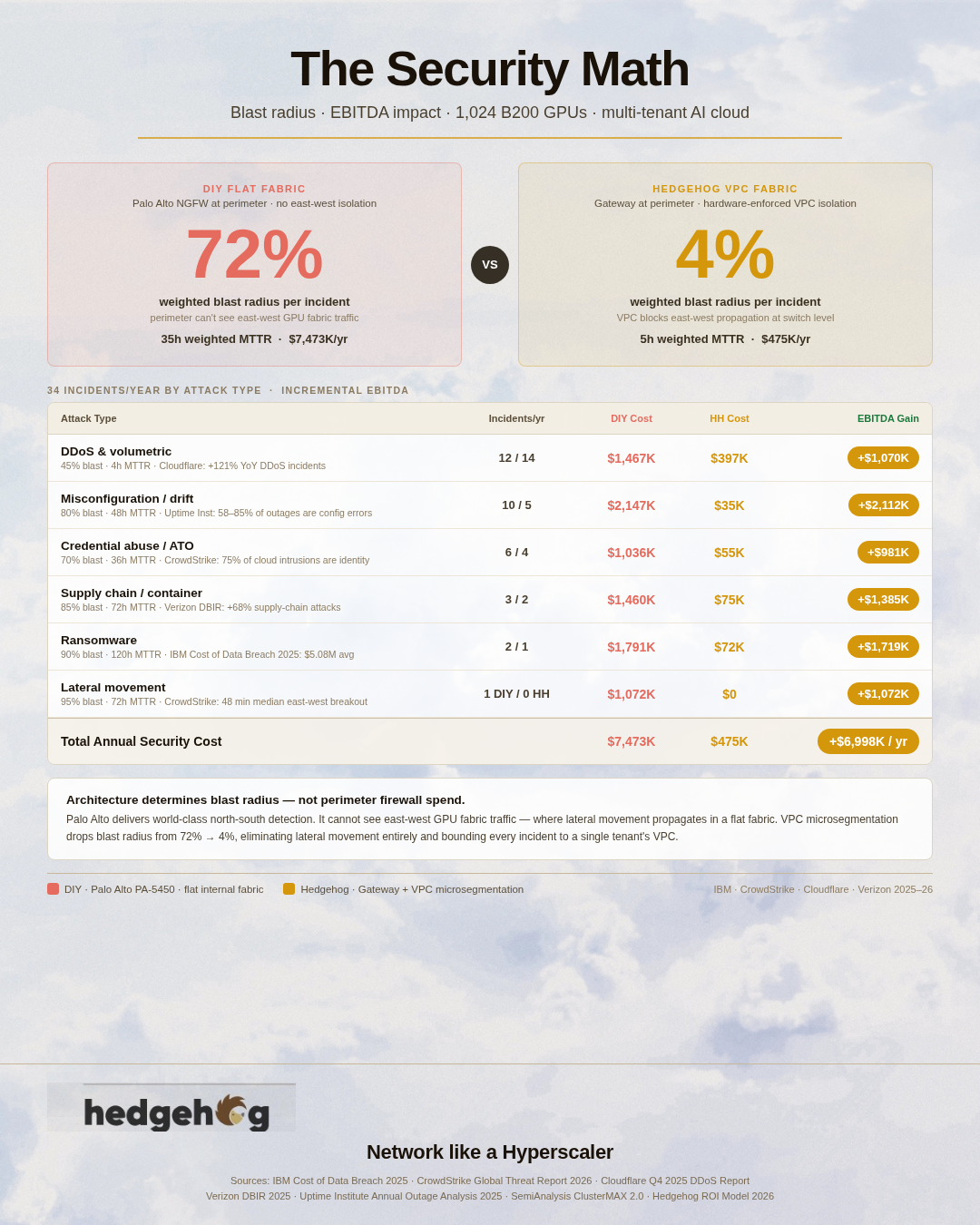
This is the architectural premise: in a multi-tenant AI cloud, the dominant security risk is east-west propagation between tenants, not north-south penetration from the Internet. Read our security blog to quantify this risk.

Why a Pair of Servers Instead of One

We recommend two Hedgehog gateway servers, not one, because:

  • Redundancy: At 200 Gbps+ of aggregate north-south bandwidth, single-box failure is a tenant-visible event. A second server in active/standby (or active/active with BGP ECMP) keeps the cluster online during gateway maintenance, software updates, or hardware failure.
  • Throughput headroom: Each gateway handles 200 Gbps comfortably. A pair gives 400 Gbps of headroom for traffic spikes.
  • Software upgrade staging: Two boxes let you upgrade one, verify, then upgrade the other — without dropping tenant traffic.

At $20K per gateway server (commodity x86 with an NVIDIA ConnectX-7 NIC, per current Dell PowerEdge R760 or Supermicro X13 pricing for 200 Gbps-capable configurations), the pair lists at $40,000. That number is the only CapEx delta between the DIY and Hedgehog scenarios in the model.


Network CapEx as a Percentage of the GPU Hardware BOM

The complete network hardware BOM — switches, cabling, and gateway — can now be assembled across the full range of accelerators tracked by the SemiAnalysis GPU Pricing Index and ClusterMAX 2.0. Hardware purchase prices are mid-market 2026 estimates sourced from Epoch AI GPU cost documentation, tech-insider.org Blackwell pricing analysis, Citi Research and Tom's Hardware AMD Instinct reporting, FS.com and NADDOD cable pricing, and Security Week NGFW pricing data.

The table uses the NVIDIA Spectrum-X switch path ($1,500/port) and shows both cabling options for a 1,024-accelerator cluster with one 800G port per accelerator and approximately 1,280 total cable runs (1,024 server-to-leaf + 256 leaf-to-spine).

Full Network CapEx by Accelerator and Cabling Option (1,024-accelerator cluster)

Accelerator

GPU BOM

Switches

Cabling A (DAC+AEC)

Cabling B (AEC+Optical)

Gateway (PA-7080)

Total DIY (Option A)

Total DIY (Option B)

H100 SXM5

$30.7M

$1.54M

$74K

$707K

$1.65M

$3.26M (10.6%)

$3.90M (12.7%)

H200 SXM5

$35.8M

$1.54M

$74K

$707K

$1.65M

$3.26M (9.1%)

$3.90M (10.9%)

B200

$41.0M

$1.54M

$74K

$707K

$1.65M

$3.26M (8.0%)

$3.90M (9.5%)

B300

$46.1M

$1.54M

$74K

$707K

$1.65M

$3.26M (7.1%)

$3.90M (8.5%)

GB200 (NVL72)

$47.1M

$1.54M

$74K

$707K

$1.65M

$3.26M (6.9%)

$3.90M (8.3%)

GB300 (NVL72)

$56.3M

$1.54M

$74K

$707K

$1.65M

$3.26M (5.8%)

$3.90M (6.9%)

MI300X

$15.4M

$1.54M

$74K

$707K

$1.65M

$3.26M (21.2%)

$3.90M (25.3%)

MI325X

$20.5M

$1.54M

$74K

$707K

$1.65M

$3.26M (15.9%)

$3.90M (19.0%)

MI355X

$25.6M

$1.54M

$74K

$707K

$1.65M

$3.26M (12.7%)

$3.90M (15.2%)

Percentages in parentheses represent total DIY network CapEx as a fraction of the GPU BOM. With the Hedgehog gateway ($40K instead of $1.65M), total network CapEx drops by $1.61M in every row.

What this table shows:

The cabling line moves from nearly invisible (0.2% on a B200 cluster, Option A) to meaningful (4.6% on an MI300X cluster, Option B). For AMD-based clusters especially, the cabling architecture decision carries real weight — the $633,000 difference between Option A and Option B represents 4.1% of the GPU BOM on MI300X hardware. On a B200 build the same dollar difference is 1.5%.

The gateway remains the single most elastic variable in the entire network BOM. The PA-7080 contributes $1.65M — a fixed cost regardless of GPU choice, cluster size, or cabling path. Its contribution to total network CapEx ranges from 42% (on a large GB300 cluster with optical cabling) to 50% (on a small MI300X build with DAC cabling). No other single line item in the network BOM swings as much in absolute dollars.

For AMD-based builds in particular, the combination of the commodity gateway and OCP switches ($600/port Celestica DS5000) brings total network hardware CapEx to approximately $1.63M — compared to $3.26M with the NVIDIA switch path and enterprise NGFW. That $1.63M difference on a $15.4M MI300X GPU BOM is 10.6% of the GPU investment.


How Hedgehog Helps With Cable Design and Procurement

Cabling a GPU AI cluster is not primarily a product-selection problem. It is a site engineering problem: what are the actual cable runs in this specific facility, what constraints exist on conduit paths and rack density, what is the realistic lifecycle of this topology before the next GPU generation refresh?

Hedgehog's design engagement includes a structured cabling consultation as part of the reference architecture validation process. We do this because it automates your operations.  Once we have documented your wiring diagam in code, Hedgehog software automates the full lifecycle of your AI network.  Design consulting in practice means:

Cable path analysis. Hedgehog reviews the facility floor plan and rack layout to determine the actual distribution of cable run lengths — not assumed averages, but measured paths. The boundary between AEC and optical is not a fixed number; it depends on whether your leaf and spine switches land in adjacent racks, the same row, or across the hall. A cluster that assumes 3-meter spine uplinks but actually has 9-meter runs will deliver intermittent link errors that are expensive to diagnose and fix after the fact.

Per-cluster media recommendations. Once run lengths are characterized, Hedgehog produces a bill of materials specifying DAC, AEC, and optical quantities with specific part numbers validated against the switch silicon chosen. Compatibility between 800G cables and specific switch ASIC firmware revisions is non-trivial — NVIDIA Spectrum-X and Broadcom Tomahawk 5 have different signal conditioning requirements, and some generic-compatible cables that work on one platform do not meet BER requirements on the other. Hedgehog's component database reflects validated combinations, not theoretical compatibility.

CapEx vs. OpEx tradeoff modeling. For teams that want to compare the two cabling scenarios across their specific facility layout and expected topology change cadence, Hedgehog provides the analysis with site-specific inputs. The crossover point at which Option B pays back its incremental $633,000 depends on labor rates, change frequency, and the penalty cost of an unplanned maintenance window. For a cluster that changes topology twice a year at $3,000 per re-cabling event, the payback is 105 years. For a cluster that changes quarterly at $10,000 per event, the payback is 16 years — still long, but the structured cabling premium may still be justified by the MTTR reduction and airflow benefits alone.

Structured cabling management. Hedgehog's ZTLM (Zero-Touch Lifecycle Management) platform maintains the logical network topology as source-of-truth configuration. When a physical cable is moved, ZTLM detects the topology change through LLDP and reconciles the actual state against the intended state — alerting the operations team if an unintended change occurred, or automatically accepting the change if it matches a planned migration. This integration between the physical cable documentation and the network control plane is what makes structured cabling fully operational rather than just organized.

Procurement guidance. Hedgehog assists with the vendor selection and volume negotiation process for cabling. At 1,024+ GPU scale, the difference between OEM-branded transceivers and validated-compatible third-party modules is approximately 3–5× in per-unit cost. For the SR8 optics in Option B, that difference across 512 modules (256 links × 2 per link) is approximately $300,000–$400,000. Hedgehog's qualified vendor list for each cable type is maintained against current production lots, not just specification sheets.


Why the Smallest Lines Determine the Largest Return

The procurement math in this post establishes the CapEx picture. For the DIY scenario with NVIDIA switches, Option A cabling, and a PA-7080 gateway, total network hardware CapEx at 1,024 B200 GPUs is $3.26M — 8.0% of the GPU BOM. With the Hedgehog gateway and OCP switches, it drops to $1.63M — 4.0% of the GPU BOM. The difference is real money.

But CapEx is not the primary story. The network BOM is the hardware you buy once. What you operate against that hardware over five to seven years — GPU utilization rates, incident blast radius, mean time to repair, security containment costs — dwarfs the initial procurement number. The performance, reliability, and security posts in this series quantify each of those. This post establishes only the procurement baseline: the hardware choices available, what they cost across the full range of current accelerators, and which choices carry architectural consequences that extend into the operating economics of the cluster.

The network is not a cost center. It is the gating constraint on the revenue-producing capacity of the GPUs sitting behind it.


Model Your Own Scenario

Every cluster is different. Switch path, cabling architecture, facility layout, cluster size, accelerator choice — each variable shifts the numbers. The Hedgehog AI Cloud Business Planning Playbook (available at hedgehog.cloud/playbook) lets you model any combination across all nine accelerators in this post, at cluster sizes from 64 to 8,192 GPUs, on either the NVIDIA or OCP switch path. The interactive AI Cloud Business Planning Playbook covers procurement alongside all six operating cost dimensions — design, deployment, time-to-GPU-value, operations, performance, reliability, and security — so that procurement decisions can be evaluated in the context of their full downstream consequences rather than in isolation.

The model is available as both a web-based wizard and a downloadable Excel workbook with every formula visible and every assumption editable. If your numbers differ from the defaults in this post — different GPU prices, different facility cable run lengths, different change cadence — the model is designed to reflect your actual situation.


Sources: FS.com 800G OSFP product catalog (May 2026); NADDOD 800G AEC and DAC product specifications; Epoch AI GPU Sales Documentation (January 2026); tech-insider.org Blackwell GPU Pricing Analysis (May 2026); Tom's Hardware AMD MI300X Pricing Report (February 2024); Citi Research AMD Instinct pricing estimates (via SeekingAlpha, 2024); SemiAnalysis GPU Pricing Index and ClusterMAX 2.0 (November 2025); Security Week Enterprise NGFW Pricing Analysis (2024); Wesco "Why AI Data Centers Need a Structured Cabling Strategy" (July 2025); Zion Communication "Why Structured Cabling Is Essential for AI Data Centers" (January 2026); NADDOD AEC technical guide; AscentOptics 800G OSFP Transceiver Guide (May 2026).


The Design Math: What It Really Takes to Architect an AI Network from Scratch — and Why Reference Architectures Exist

1 min read

The Design Math: What It Really Takes to Architect an AI Network from Scratch — and Why Reference Architectures Exist

We recently announced that Hedgehog is an NVIDIA-validated solution architecture for NVIDIA Spectrum-X. We also announced that the Open Compute...

Read More
Dell'Oro Data Center Switch Report: The Market Is Choosing Ethernet for AI

1 min read

Dell'Oro Data Center Switch Report: The Market Is Choosing Ethernet for AI

Dell'Oro Group just released their 4Q 2024 Ethernet Switch - Data Center Report showing record-breaking sales fueled by AI buildouts and a recovery...

Read More
Hedgehog AI Network delivers $50K minimum ROI per GPU

1 min read

Hedgehog AI Network delivers $50K minimum ROI per GPU

In my “AI Needs a New Network” post last week, I noted that NVIDIA reported $13 billion in networking ARR on $18.4 billion of annual data center...

Read More